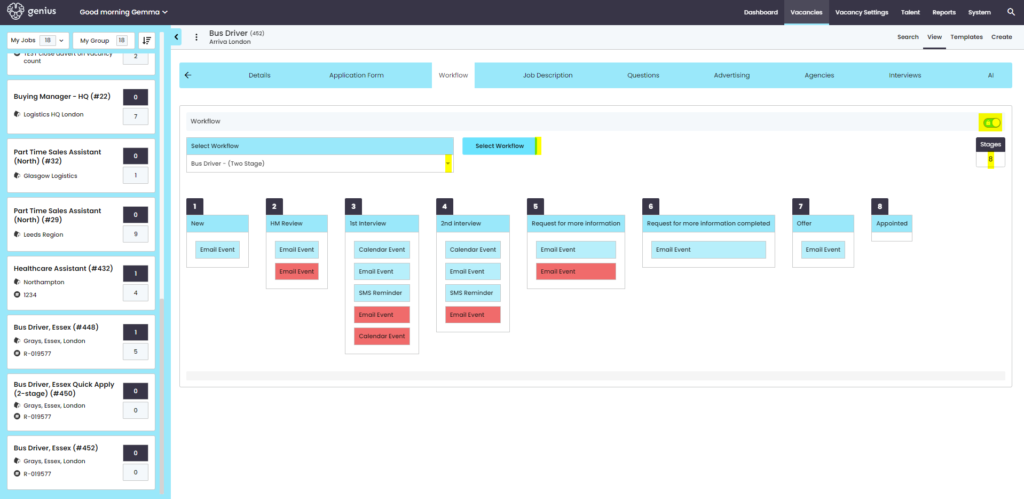
Workflows are associated on a vacancy-by-vacancy basis. Use the dropdown to select from the list of pre-created Workflows. The workflow determines what happens at each stage of the recruitment process, by invoking email templates for e.g. ‘Invite to First Interview’, decline email or a ‘Request For More Information’ (RMFI) from the candidate.
Vacancy Template View:
Vacancy Applications (Kanban view)
Workflows are associated on a vacancy basis. use the dropdown to select from the list of pre-created Workflows. The workflow determines what happens at each stage of the recruitment process, by invoking email templates for e.g. ‘Invite to First Interview’, decline email or a ‘Request For More Information’ (RMFI) from the candidate.
At each stage a ‘progress’ or ‘decline’ process is available and will subsequently invoke the associated communications to Candidates, Authorisers or users associated with the vacancy.
- The Blue information is progression information
- The Red information is decline information
NOTE: A workflow can be changed (if a user has the correct permission) once a vacancy has been published, however this means that any new applicants will follow the new process whereas older applications will follow the original workflow and cannot be changed.
TIP: If a workflow is changed on a vacancy template, this does not update any vacancies created from that template. You have to update each live vacancy manually.